 Prospects Pulse
RESEARCH / OUTBOUND
An Apollo and ZoomInfo alternative built for your niche
If your ideal buyers do not fit a database filter, changing the filter will only take you so far. We research the market behind your brief and build a list your team can inspect.
Start here if shared databases keep missing your buyers. We research your niche from specialist sources instead of filtering one more list, then deliver companies with evidence and checked contacts. If your current tool already covers the market, we will tell you so.
Start with what the search is missing
You know the kind of company that buys from you. But the search keeps returning broad categories, irrelevant subsidiaries or businesses using the wrong technology. Your sales team spends its time checking rows instead of speaking to people. Adding another title filter does not solve a missing account universe.
Our alternative is a research service. We start with your ideal customer profile, find evidence that a company fits, then identify the people worth approaching. The question is not simply whether an email exists. It is why this company belongs in your market and why this person should hear from you now.
That distinction matters when the buying condition is specific: a legacy ERP platform, a regulated activity, a public procurement requirement or a service mentioned in a tender. These clues live in documents and specialist sources. They do not always map neatly to an industry label.
When Apollo or ZoomInfo is a sensible choice
A shared contact database can be useful when your market is broad, the companies are already well known and standard filters describe the buyer accurately. If your team needs self-service prospecting across familiar sectors, a database subscription may fit the workflow well. We do not claim that either platform is unsuitable for every niche.
Keep the tool that already works for you. Custom research can fill a missing segment alongside it. Before replacing a subscription, compare coverage, relevance, evidence and the work your team has to do after export. A large result count is not the same as a usable target list.
If the account universe is clear and your only problem is old contact details, a data check may be the better starting point. If the universe itself is uncertain, define the market before commissioning contact research. The right choice depends on the gap you can actually name.
| Question | Shared database | Custom research |
|---|---|---|
| Starting point | Search within a shared database | Define the market and research sources |
| Account evidence | Review what the platform provides | Source evidence agreed per row |
| Workflow | Self-service search and export | Scoped research and reviewed sample |
| Best fit | Broad, familiar account filters | Specific buying conditions and missing accounts |
Sources chosen for the buying condition
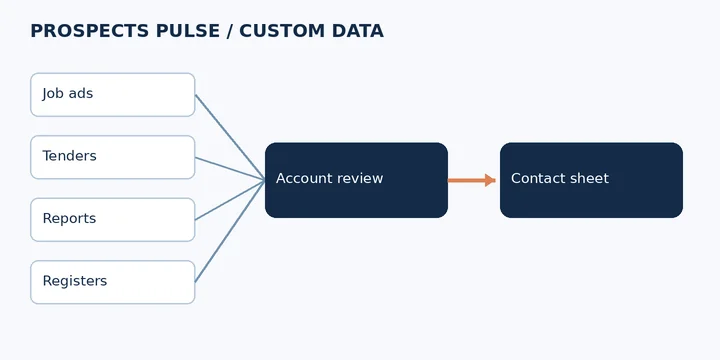
Job ads can show a technology in use or a team being built. Public tenders can describe an upcoming requirement. Annual reports can explain an operating change. Registers can identify businesses with a particular licence. Event lists and tech mentions can reveal companies that a broad sector search overlooks.
We choose sources around your brief rather than collecting everything available. A passing mention is a lead for research, not proof of a current purchase plan. We check which company the source describes, how old it is and whether it supports the inclusion rule. Subsidiaries and similarly named companies need particular care.
Public information still needs a permitted purpose and appropriate handling. We review the source, personal data involved and intended outreach market before agreeing scope. A public directory is not blanket permission to contact everyone in it. We can exclude sources or fields that do not fit the agreed use.
How a custom build works
First, we agree the account rules: geography, company type, size where relevant, buying condition and exclusions. Bring examples of customers you want more of and examples that look similar but would never buy. Those negative examples often reveal the most useful distinction in the brief.
Next, we choose source routes and review a sample together. You can challenge the account matches before the brief becomes a larger build. We then research buying roles within the accepted companies. A job title alone is not enough if responsibility sits with a parent business or a different operating unit.
Email checks come after account and role matching. Catch-all domains are labelled separately because they do not establish that an individual mailbox exists. When outreach runs, bounces are tracked and removed. Verification is a point-in-time check, so it does not justify a claim that every future email will arrive.
You receive a Google Sheet with agreed company fields, buyer roles, verified email status and a source per row. The evidence lets your team review why an account was included. We agree the field definitions and handover format before delivery so the sheet fits the next step in your sales process.
A dated example: Navision to Business Central
In his 4 November 2026 post, Nilesh described a campaign built around evidence of Microsoft Dynamics Navision use. Job ads, tenders and annual reports supplied the starting clues. The workflow then filtered company fit and found dated facts to support a relevant message.
The exact extract below is historical evidence from that post. It is a small sample, not a forecast for your niche. The full Insight preserves the original account, including the roles involved and the limits Nilesh stated. We would assess a new ERP brief on its own evidence rather than assume the same response.
The practical lesson is about selection. Start with a reason to believe a company uses the relevant system, then check the company and buying role. Do not treat every mention of Microsoft Dynamics as evidence of the same product, version or migration need.
3. The raw set (43,795) gets filtered on company size, geography and tech signals.
What came back in the last two weeks: • 2 replies • 2 booked meetings • One with a UK haircare brand's Head of IT who still runs Navision and is weighing a Business Central move. • One with an Irish drinks and snacks brand's Finance Manager whose CFO signed the mandate.
Two meetings is a small sample. But both are the right role, the right need and the right timing. That is what this list pulled out of thin air.
Nilesh Patil, 4 November 2026. Read the complete Navision post.
Choose the handover your team needs
Some buyers want a researched account universe for their own sales team. Others need contacts attached to accounts they already trust. We can scope either, and discuss managed outreach separately if you want us to run it. You keep responsibility for qualification, demonstrations and closing.
Before asking for a quote, send the target countries, the buying condition and the roles you need. Tell us what your current database misses and which existing customers demonstrate a good fit. We can then discuss whether source-led research adds something useful. If your current tool covers the market well, there is no reason to rebuild it merely to create a different spreadsheet.
A few useful answers
Does this replace my Apollo or ZoomInfo subscription?
It can replace the list-building task for a specific niche, or complement your subscription. We scope the gap before recommending a build.
Can you research companies using a legacy ERP?
We can assess public signals such as job ads, tenders and reports. A technology mention needs checking; it does not prove a current migration project.
What will I receive?
An agreed Google Sheet of researched companies and contacts, with source evidence and email status. Fields are agreed around your brief.
Are catch-all emails counted as verified?
No. Catch-all domains are labelled separately because they do not confirm an individual mailbox.
Can you check a list I already have?
Yes. Use our data-check page to discuss a comparison of your existing rows before commissioning a new build.
Can I see a sample before deciding?
Yes. Request the free sample of 25 checked contacts in your niche and share your account rules, geography and buyer roles.
Start with your buyer profile.
Free sample: 25 checked contacts in your niche. No card, no contract.
Send us a quick enquiry.
A person will reply. No call needed.